🏆 Two-Step Equation Challenge: Smart Board Team Tournament Rules
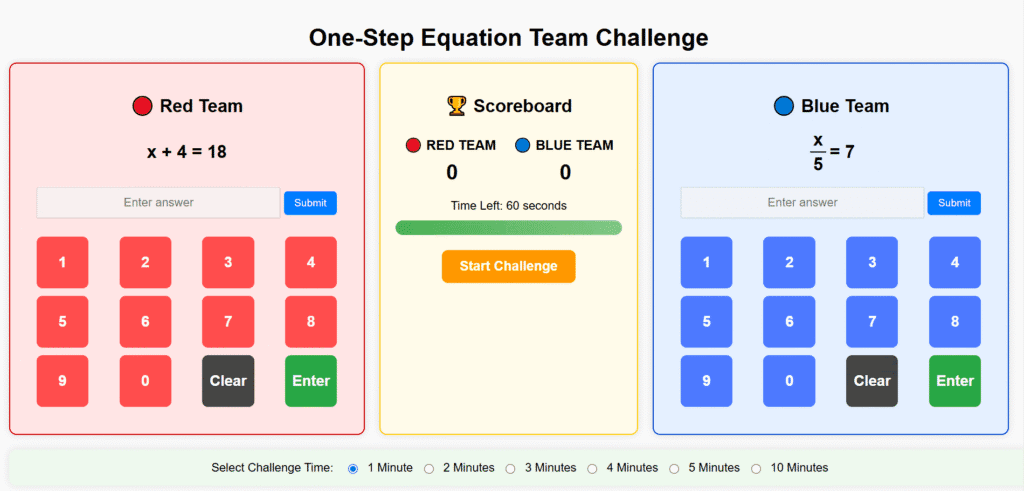
Looking for an exciting way to strengthen your students’ algebra skills? The Two-Step Equation Challenge turns solving equations into a fast-paced, collaborative competition that works perfectly on any Smart Board or interactive display. Students will practice solving equations like
2x + 5 = 17 or (x – 3) × 4 = 28 while racing the clock as a team!
Create Teams
Students can compete individually or in groups, depending on the time you select:
- 1 minute → Students compete individually.
- 2 minutes → Students form pairs.
- 3 minutes → Groups of three.
- 4 minutes → Groups of four.
- 5 minutes → Groups of five.
Team Names & Title
Each team chooses a creative name (e.g., “Variable Victors” or “The Isolators”).
Teachers enter the tournament title (e.g., “Period 2 Algebra II Face-Off”).
Strategy Discussion
Before the round starts, teams meet briefly to plan their player order.
Students decide who will go first, second, third, and so on.
⚡ Setup Your Challenge
🎮 How to Play
- The teacher selects the time and starts the Smart Board challenge.
- Each student has one minute to solve as many two-step equations as possible.
- When the timer sound plays, the current player stops, and the next teammate immediately takes over.
- The rotation continues until all teammates have had their turn.
- Teams can discuss strategy between turns, but only one student interacts with the Smart Board at a time.
💡 Tip: The Smart Board interface allows teams to tap answers directly on screen, keeping gameplay fast and interactive.
📊 Scoring
- Each correct equation solved = 1 point.
- The team with the highest total score wins the round.
- If there’s a tie, the teacher may run a 30-second sudden-death round or declare a shared victory.
🧮 Optional Penalty Points Mode
To make the Two-Step Equation Challenge even more strategic (and prevent careless mistakes), you can enable the Penalty Points mode:
- At the start, check the “Enable Penalty Points” box in the setup screen.
- When Penalty Points are ON, each time a team submits an incorrect answer, one point is awarded to the opposing team.
- Example: If Team Blue makes 2 incorrect answers, Team Red gains 2 extra points.
- When Penalty Points are OFF, wrong answers simply count as zero (no bonus for the other team).
This optional rule rewards accuracy over speed — a perfect fit for two-step equations, where careful reasoning and correct order of operations matter most.
🏅 Tournament Options
Teachers can run the Two-Step Equation Challenge as a classroom-wide or school-wide competition:
- League format → Teams face each other over several sessions, collecting wins and losses.
- Elimination format → Winners advance, losers are eliminated.
- Bracket play → Host quarterfinals, semifinals, and a grand final to crown the ultimate Algebra Champion.
📌 Tips for Teachers
- Keep rotations quick — students should be ready to switch at the one-minute signal.
- Encourage team communication and cheering — collaboration builds energy and confidence.
- Offer small prizes or leaderboard recognition to keep motivation high.
- Remind students that accuracy and reasoning count — they should show both steps when solving (undo addition/subtraction first, then multiplication/division, or vice versa).
- Use the Smart Board’s interactive tools (e.g., writing tools or on-screen scratch space) to let students demonstrate their solving process visually.
✨ With this setup, practicing two-step equations becomes a team sport — engaging, competitive, and perfect for visual, hands-on learning with the Smart Board. Watch your students’ algebra skills grow as they master solving for x through teamwork and friendly competition!
If you click the links below and make a purchase, we earn a commission at no additional cost to you.