Introduction to Classroom Tablets
Tablets, like iPads, are powerful tools for modern classrooms. They make learning interactive, engaging, and adaptable to different learning styles. Visual learners can watch videos, auditory learners can listen to podcasts, and kinesthetic learners can use touch-based apps—helping every student learn in their own way.
For teachers, tablets streamline lessons with note-taking, research, and collaboration tools. They’re great for interactive lessons, group projects, and creative activities, making classroom management easier and more dynamic.
Using tablets daily not only boosts learning but also prepares students for a tech-driven world, encouraging curiosity, exploration, and innovation.
Top Ten Tablets for Educators on Amazon
In the ever-evolving landscape of educational technology, tablets have become indispensable classroom supplies for educators seeking to enhance learning experiences. Below is a list of the top ten tablets available on Amazon that cater specifically to the needs of educators, each accompanied by features that make them suitable for classroom engagement.
If you click the link below and make a purchase, we earn a commission at no additional cost to you.
1. Apple iPad (9th Generation): Renowned for its robust performance, the iPad offers seamless multitasking capabilities with its A13 Bionic chip. Its extensive app ecosystem ensures access to numerous educational applications, making it a versatile choice for teachers and students alike.

2. Samsung Galaxy Tab S7: This tablet features an impressive display and a powerful Snapdragon processor, ideal for interactive learning. The included S Pen allows educators to annotate directly on digital documents, enhancing presentations and notes.

- 11″ LTPS TFT, 120Hz, HDR10+, 1600 x 2560 pixels, S Pen support, 9ms pen latency
- 128GB ROM, 6GB RAM, Qualcomm SDM865+ Octa Core (3.09GHz + 2.4GHz + 1.8GHz), Adreno 650, 8000mAh Battery
- Rear Camera: 13MP, f/2.0 + 5MP, f/2.2, Front Camera: 8MP, f/2.0, Android 10, One UI 2.5, Wi-Fi 6 (802.11 a/b/g/n/ac/ax),…
3. Microsoft Surface Pro 7: Combining a tablet’s portability with a laptop’s functionality, this device is excellent for educators who require flexibility. With Windows OS, teachers can run a variety of software, including Microsoft Office and other essential school supplies programs.

- Product Type – TABLET COMPUTER
- Next-gen, best-in-class laptop with the versatility of a studio and tablet, so you can type, touch, draw, write, work, a…
- More ways to connect, with both USB-C and USB-A ports for connecting to displays, docking stations and more, as well as …

4. Amazon Fire HD 10: Budget-friendly and equipped with a durable design, this tablet is perfect for classroom use. Its access to educational content through Amazon’s ecosystem makes it a great choice for supplemental learning resources.

- Do what you love, uninterrupted — 25% faster performance than the previous generation and 3 GB RAM are ideal for seamles…
- High-def entertainment — A 10.1″ 1080p Full HD display brings brilliant color to all your shows and games. Binge watch l…
- Thin, light, durable — Tap into entertainment from anywhere with a lightweight, durable design and strengthened glass ma…
5. Lenovo Tab P11 Plus: This tablet stands out for its quality display and impressive battery life, making it suitable for long school days. The Google Kids Space offers a safe environment for younger students to explore educational content.

- Get Drawn In: Get drawn deeper into the story in 1080p full-HD with an expansive 11.5” 2K display
- Less buffer, faster fragging: Game with Xbox Cloud Gaming (Xbox Cloud Gaming Subscription Required) on an octa-core proc…
- Split the view. Double the efficiency: Work on two apps simultaneously with the split-screen on mode on Android 12L
6. Huawei MatePad Pro: With a sleek design and powerful Kirin processor, this tablet offers a great experience for educational purposes. Its multi-window feature allows teachers to manage different activities simultaneously.
7. Asus ZenPad 3S 10: This tablet combines performance with affordability, featuring an excellent display and sound quality. It is well-suited for media presentations and engaging teaching methods.

- 10.1″ WXGA IPS Display (1280 x 800) with ASUS TruVivid technology for better visual experience
- Powered by Quad Core 1.3 GHz, 64 bit MediaTek MTK 8163B processor
- Easily handle and speed up productivity with 4680 mAh battery, 2GB RAM, 16GB storage
8. Microsoft Surface Go 2: Known for its lightweight design and portability, the Surface Go 2 is ideal for educators who are always on the move. Its compatibility with various educational apps makes it a worthwhile investment for school supplies.
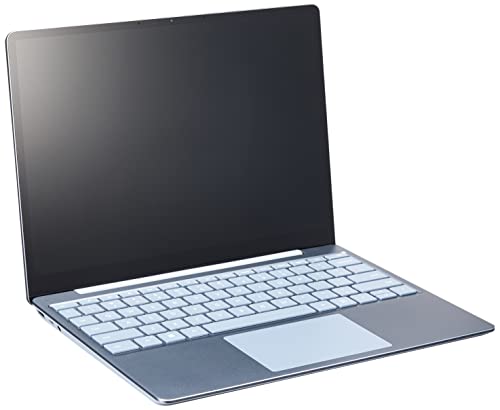
- Light, portable Surface touchscreen Laptop with Windows 11 [2] and 12.4” PixelSense Display. [1] Starting at just 2.48 p…
- Work, play, stream, and run day-to-day apps with 11th Gen Intel Core i5 processor.
- Look and sound your best on video calls with improved HD camera and built-in Studio Mics, plus rich sound for music and …
9. Samsung Galaxy Tab A: This entry-level tablet offers a reliable experience for educators looking for an affordable option. Its user-friendly interface and access to educational apps make it a good starting point for classroom learning.

- ATTENTION: this is the WIFI ONLY model
- Packaging contains the cell phone, a USB C to USB C cable, and a sim tray ejector tool. Seller provides a USB C wall ada…
- Display: TFT LCD | 8.7 inches, 214.9 cm2 (~81.7% screen-to-body ratio) | 800 x 1340 pixels, 5:3 ratio (~179 ppi density)
10. Apple iPad Mini: Compact and powerful, the iPad Mini is perfect for educators who prefer smaller devices. Its size makes it easy to carry around, while still providing access to comprehensive educational resources.

- This Certified Refurbished product is tested and certified to look and work like new, with limited to no wear. The refur…
- 7.9″ Retina Display, 2048 x 1536 Resolution
- Apple iOS 9, Dual-Core A8 Chip with Quad-Core Graphics
These ten tablets represent some of the best options available on Amazon for educators committed to improving the learning experience in their classrooms. Each tablet brings unique features that can cater to different teaching styles and educational needs, enhancing engagement and productivity among students.
Conclusion: Choosing the Right Tablet for Your Classroom
Selecting the right tablet goes beyond price or brand—it’s about matching your teaching style with your students’ learning needs. Consider factors like operating system, screen size, stylus compatibility, and compatibility with apps or interactive tools.
The right tablet can transform lessons, offering digital textbooks, interactive apps, and collaborative learning opportunities that traditional supplies can’t. By choosing wisely, teachers can create engaging, creative, and tech-friendly classrooms that support every student’s learning journey.