Introduction to Robotic Arms
Robotic arms are essential tools in modern robotics, blending engineering and programming in a hands-on way that excites both students and educators. Building and operating a robotic arm helps learners strengthen problem-solving, critical thinking, and design skills — making it a core experience in STEM education and robotics competitions like the Science Olympiad, FIRST Tech Challenge (FTC), VEX Robotics, and Genius Olympiad.
There are several types of robotic arms, each designed for different learning goals and technical challenges. A single-bar arm offers simple motion and is perfect for beginners learning the basics of robotics. The four-bar arm introduces more complex movement and precision, ideal for tasks that require controlled manipulation. For advanced builders, the double reverse four-bar arm provides the highest flexibility and range of motion, making it great for automation and competitive robotics.
Top Robotic Arm Kits Available on Amazon
Exploring these designs helps students understand real engineering principles while inspiring creativity and innovation. Whether in a classroom or a robotics lab, robotic arms provide a powerful way to bring STEM learning to life and prepare students for the future of technology.
Investing in a robot arm kit is a practical way to engage students in the exciting world of robotics and engineering. Below, we present a selection of five highly-rated robot arm kits available on Amazon, carefully chosen for their educational value and versatility.
If you click the links below and make a purchase, we earn a commission at no additional cost to you.
1. Makeblock mBlock Ranger
The mBlock Ranger allows users to design and control their own robot arm through coding, integrating STEM education with hands-on experience. With advanced programming options available through the mBlock app, students can develop problem-solving skills while operating the robot arm.

- Learn AI through Play: Kids can ask mBot2 about the weather, make it sing, change the lights to make it move, or flip it…
- Easy to Use: Build mBot2 robotics kit from scratch by following the step-by-step guide. Play the STEM toys mBot2 with 8+…
- Coding Learning Path: Program mBot2 with 4 coding project cards and see it moves the way you wants! (No coding experienc…
- The Best in Its Class: Designed from Makeblock’s mBuild platform, mBot2 coding robot comes with 10+ advanced sensors (al…

2. OWI Robotic Arm Edge
The OWI Robotic Arm Edge is ideal for younger students aged 8 and above. This kit challenges users to build and control a five-axis robotic arm using a wired remote control. It’s an affordable entry point for those seeking to understand the basic principles of robotics without the complexities of programming.

- Using your computer and the included USB cable and interface software command the Robotic Arm Edge with multiple movemen…
- Excellent introduction to robotics programming
- Add as part of your home-school curriculum
- Robotic Arm not included
- OWI is the premier line of educational robotics kits
3. SunFounder PiArms
For approximately $99.99, the SunFounder PiArms robot arm is tailored for Raspberry Pi enthusiasts aged 12 and older. This kit combines mechanical design with coding, enabling students to program the robot arm for various tasks. It is an excellent way to bridge the gap between robotics and computer science education.
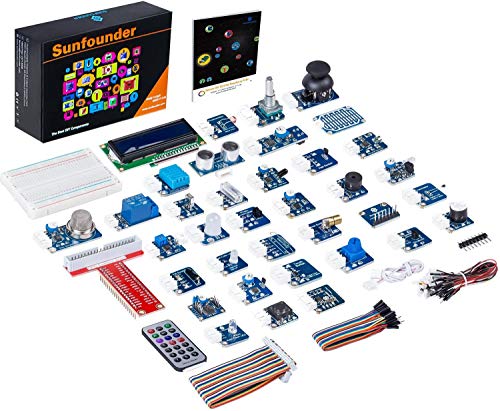
- Learn to code easily- You learn how to code faster and easier than ever with this visual programming language software.
- 37 sensor modules- there are a whopping 37 self-designed sensor modules included, elaborately made and all of roughly th…
- 35 projects provided- This sensor kit provides a record 35 projects with diverse functions allowing for a dynamic creati…
4. VEX Robotics
The VEX Robotics VEX IQ kit is designed for ages 8 and up. Known for its high-quality parts and programming capabilities, this kit allows students to create their own designs and custom robot arms. The emphasis on collaboration and competition makes it a favorite in educational settings such as FIRST Tech Challenge (FTC) events.

- Smart Phone Controlled
- 7 different robotic designs to build!
- Build from over 800 VEX IQ pieces
- Ages 8 and up
- Additional builds available within the VEX Pilot App!
5. LEGO Mindstorms EV3
While more of a comprehensive robotics kit, the LEGO Mindstorms EV3 includes the capability to build various robots, including a robot arm. Targeted towards students aged 10 and older, this kit combines coding, engineering, and creativity, providing a robust introduction to robotics.

- Art. No.45544
- Material No. 6250574
- Product Name: LEGO MINDSTORMS Education EV3 Core Set
- Included: Rechargeable battery (Art. No.45501)
- Charger (Art. No.45517) Sold separately
For further exploration, links to these products can be found on Amazon, along with images and user ratings to assist in making an informed choice about which robot arm kit to purchase.
Step-by-Step DIY Process for Assembling a Robotic Arm
Building a robotic arm is a fun, hands-on way to explore STEM concepts while developing problem-solving and engineering skills. Whether you’re a teacher guiding students or a robotics enthusiast, assembling a robotic arm brings theory to life through real-world application.
Start by choosing a reliable robotics kit — FTC or VEX kits are great options, offering all essential components and clear instructions. Before beginning, gather tools such as screwdrivers, pliers, and possibly a soldering iron, depending on your kit.
Begin with the base assembly, securing the motor mounts and structural supports tightly for stability. Next, attach the joints and arm segments, ensuring each motor and connection moves freely without obstruction. Performing a loose test fit before tightening screws helps guarantee smooth articulation.
Once the frame is complete, move to wiring and electronics. Connect each motor to the control board according to the guide, taking care to route wires neatly and avoid pinching. Then use your kit’s software to calibrate the motors, fine-tuning movement and responsiveness. Finally, test the robotic arm by running motion sequences and troubleshooting any issues that arise.
Future of Robotics in Education
Robotic arms have become a cornerstone of STEM education, especially in competitions like FIRST Tech Challenge (FTC) and VEX Robotics. These projects allow students to apply programming and engineering concepts in meaningful, hands-on ways, boosting creativity and teamwork.
As schools continue integrating robotics, students gain essential 21st-century skills — from coding and design to collaboration and innovation. Looking ahead, robotics education will increasingly include AI, automation, and machine learning, preparing young learners for careers in a rapidly evolving tech world.
By encouraging students to build and experiment with robotic arms, educators help shape a generation ready to innovate, create, and lead the future of robotics.